
Raèld Busscomp. Glue for the drums, the mix and the master.
A VCA bus compressor modelled on the classic console bus compressors. One gain for both sides, so the stereo image never moves; stepped ratio, attack and release; a release that sets itself; and a bass that stays clean while it works. Until it compresses, your audio passes through untouched, bit for bit.
One-time payment · 3 computers · Instant download
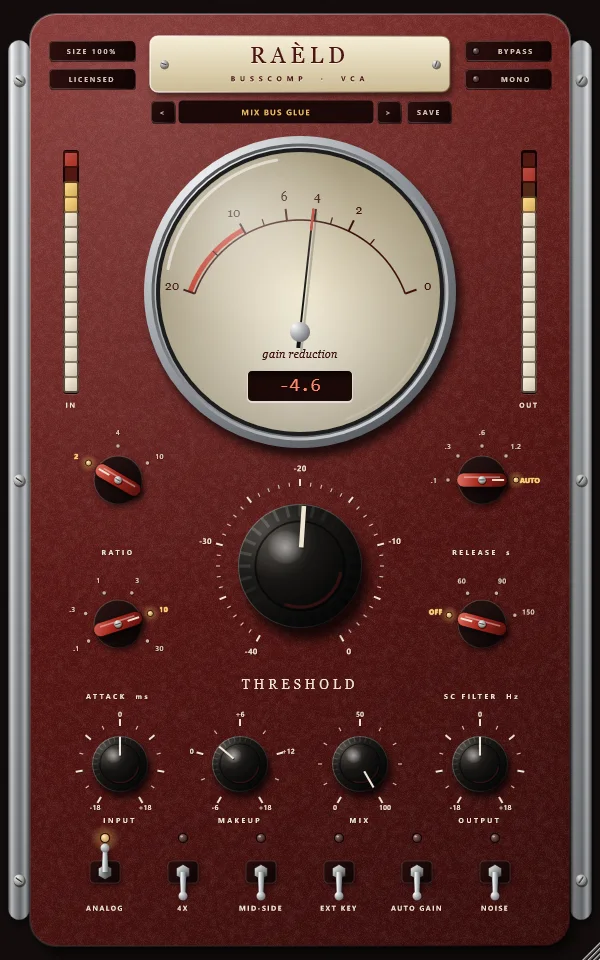
The console glue, measured
Raèld Busscomp follows the documented behaviour of console VCA bus compressors: feed-forward, stereo-linked, a soft knee that firms up as the ratio rises, stepped timing and a program-dependent auto release. Each of these is measured in our tests.
One gain for both sides
A loud sound on the left turns the right down by exactly the same amount, so the stereo image never moves. Or switch to MID-SIDE to compress the centre and the sides separately, click-free.
Stepped like the hardware
RATIO 2, 4 or 10 to 1, with a knee that firms up as it rises (6, 4 and 2 dB wide). ATTACK from 0.1 to 30 ms; RELEASE from 0.1 to 1.2 s, or AUTO.
A release that sets itself
AUTO lets go quickly after a short hit and slowly after sustained compression: measured 210 ms after a 30 ms hit, 1.14 s after three seconds of compression.
A clean low end
A short hold in the detector stops bass waveforms from wobbling the gain: 0.0003% distortion at 30 Hz with 2.4 dB of reduction. SC FILTER keeps a big kick or bass from pulling the whole mix down.
ANALOG, or perfectly clean
Gentle harmonics from the VCA, the output stage and an output transformer that adds weight to the bass first, oversampled 2x or 4x. Off, the compressor is completely clean, with no latency.
Sidechain, MIX and AUTO GAIN
EXT KEY compresses from your DAW's sidechain send. MIX blends in the dry sound for parallel compression, exactly in time. AUTO GAIN matches the loudness so bypass never fools your ears.
A tower of oxblood enamel and chrome
Busscomp has an interface of its own: a tall panel of deep red enamel between chrome rails, made to feel like a piece of studio hardware.
A gain-reduction gauge
A round gauge under domed glass, from 0 on the right to 20 dB on the left. The needle moves like a VU meter (99% of a change in 300 ms, with a slight overshoot), and the window below shows the exact figure.
Knobs and selectors that feel real
Black knobs with about 300° of travel, Shift for fine control, double-click to reset and a readout that fades in while you turn. Red selector bars snap firmly into each step, with the chosen one lit.
Levers and LED columns
Chrome levers with a lamp that glows when they're on. LED columns show the input and output levels, holding each peak for a second. Size the window from 75 to 175%; it's remembered.
From a gentle master to a smashed kit
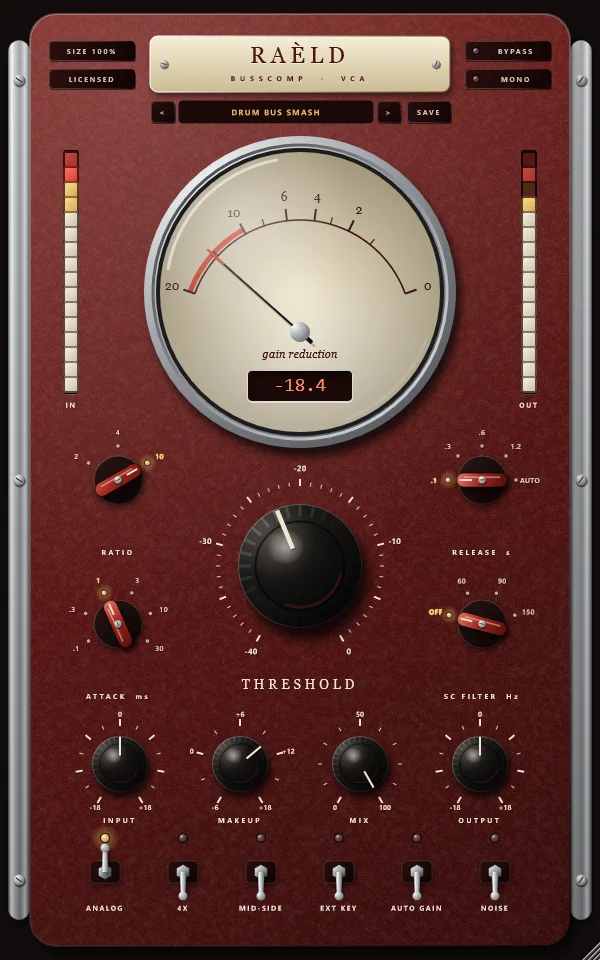
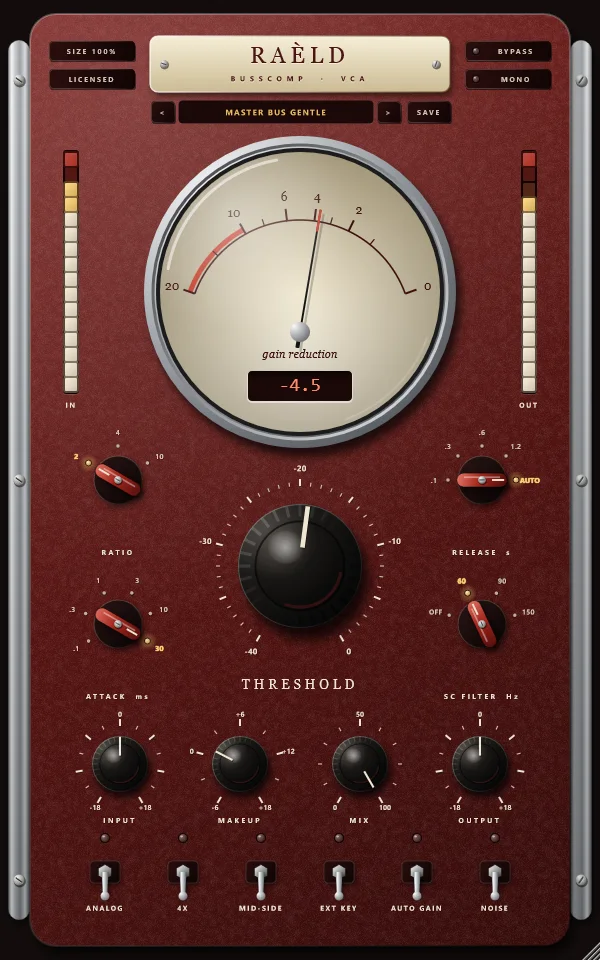
The same compressor, set for three jobs.
Stepped where it counts
| Control | What it does |
|---|---|
| INPUT | Gain into the compressor, −18 to +18 dB: drives it harder or softer without moving THRESHOLD. |
| THRESHOLD | Where it starts to compress, −40 to 0 dBFS. |
| RATIO | 2, 4 or 10 to 1. The knee is soft at 2:1 (6 dB wide), firmer at 4:1 (4 dB) and 10:1 (2 dB). |
| ATTACK | 0.1, 0.3, 1, 3, 10 or 30 ms. Slower lets the front of each hit through. |
| RELEASE | 0.1, 0.3, 0.6 or 1.2 s, or AUTO: quick after a short hit, slower after sustained compression. |
| SC FILTER | Off, 60, 90 or 150 Hz: keeps the low end out of the detector, so a big kick or bass doesn't push the whole mix down. |
| EXT KEY | Compress from the sidechain input your DAW sends (for example a kick ducking a bass). Not saved in presets. |
| MID-SIDE | Off: one reduction for both sides. On: the centre and the sides compressed separately. |
| MAKEUP | Gain after the compressor, −6 to +18 dB. |
| MIX | Blend of compressed and untouched sound, for parallel compression. Both stay exactly in time, so any blend is clean. |
| OUTPUT | Gain at the very end, −18 to +18 dB. |
| ANALOG / 4X | Gentle harmonics from the VCA, the output stage and an output transformer, oversampled 2x (or 4x with the 4X lever). Off: completely clean, with no latency. |
| AUTO GAIN | Matches the output's loudness to the input's, so you can judge the compression against bypass at the same level. Not saved in presets. |
| NOISE | A very low analog noise floor (−100 dBFS). Off by default. |
| BYPASS / MONO | BYPASS crossfades to the dry sound, latency-compensated. MONO folds the output to mono, to check the mix on a mono speaker; not saved in presets. |
What we measured
| Test | Result |
|---|---|
| Below the threshold, ANALOG off, trims and makeup at 0, any MIX, stereo or mid-side | bit-for-bit the input, with no latency |
| Latency at 48 kHz | 0 with ANALOG off; 23 samples (0.5 ms) at 2x, 28 (0.6 ms) at 4x; reported to your DAW |
| Static curve, every ratio, −40 to 0 dBFS | within 0.000002 dB of the designed curve |
| Attack, time to 63% of the reduction | each setting within 2% and one sample, at 44.1, 48, 88.2 and 96 kHz |
| Release, time to 63% recovered | the setting plus 16 ms (the hold that keeps the bass clean): 0.1 s: 116 ms; 1.2 s: 1216 ms |
| AUTO release, 90% recovered | 210 ms after a 30 ms hit; 1.14 s after 3 s of compression |
| A loud tone on the left only | the right gets exactly the same reduction: the image doesn't move |
| Bass distortion, 2:1, 30 ms, AUTO, 2.4 dB of reduction, ANALOG off | 0.0003% at 30 Hz, under 0.000001% at 40 Hz and above |
| ANALOG, THD with no reduction | 1 kHz: 0.006% at −18 dBFS, 0.05% at −6 dBFS; 30 Hz at −6 dBFS: 0.15% (the transformer saturates the bass first); 1 kHz at −6 dBFS with 7 dB of reduction: 0.12% |
| Harmonics folding back (a 15 kHz tone driven hard) | below −122 dB at 2x and 4x |
| 50% MIX with +6 dB on the compressed path, ANALOG on | within 0.0004 dB from 40 Hz to 16 kHz: no comb filtering |
| CPU (stereo, 48 kHz) | 0.12% of one core with ANALOG off; 0.32% at 2x; 0.52% at 4x |
Modelled on the documented behaviour of console VCA bus compressors (topology, ratios, timing, auto release) and measured on test signals, not against a particular unit. Your ears are the judge.
Seven presets to start from
They suit material peaking around −6 dBFS: move THRESHOLD until the needle shows the reduction the preset describes.
| Preset | What it's for |
|---|---|
| Mix Bus Glue | The classic glue: 2:1, 10 ms attack, AUTO release. Aim for 2 to 3 dB on the needle. |
| Master Bus Gentle | Clean control for the master: 2:1, the slowest attack, AUTO release, the sub out of the detector, ANALOG off. 1 to 2 dB of reduction. |
| Drum Bus Smash | 10:1, fast attack and release: the kit squashed and pumping, about 12 dB on the hits. |
| Parallel Punch | Heavy, fast compression (about 16 dB on the hits) blended 40% under the dry drums: size without losing the hits. |
| Vocal Bus | 4:1, 3 ms attack, 0.3 s release, plosives kept out of the detector: vocals sitting together. |
| Piano/Keys Bus | Gentle, even control that keeps the attack of each note: 2:1, 30 ms, 0.6 s. |
| Loud Modern Master | Denser master control: 4:1, 10 ms attack, AUTO release, the low end out of the detector, ANALOG at 4x. 2 to 4 dB of reduction. |
Plus Init: 2:1 at −12 dB, 10 ms attack, AUTO release, ANALOG on.
Own it, or get it with everything else
Raèld Busscomp
One-time payment. No subscription.
- VST3 plugin and standalone app
- One license for up to 3 of your computers
- Never expires, works offline 30 days at a time
- Download link and license key by email, instantly
Every Raèld plugin
or $99/year
- Raèld Busscomp plus every other Raèld plugin
- Every new plugin the day it's released
- One key for all of them, on 3 computers
- Cancel anytime
Secure checkout by Lemon Squeezy. Sales tax and VAT calculated at checkout.
Windows 10/11 (64-bit), VST3 and standalone. Download Raeld-Busscomp-1.0.0-Windows.zip; DAWs list it as "Raeld Busscomp", so type "raeld" to find it.
Good to know
Where do I start?
Pick a preset close to your source, or Init. Lower THRESHOLD until the needle shows the reduction you want: 1 to 3 dB to glue a mix or a master, 10 dB or more to squash drums. 10 or 30 ms of ATTACK lets the front of each hit through; AUTO release suits most things. Bring the level back with MAKEUP, or turn on AUTO GAIN to compare with bypass at the same loudness.
Does it add latency?
Not with ANALOG off: then it has no latency at all. With ANALOG on it's 23 samples at 2x and 28 at 4x (about half a millisecond at 48 kHz), reported to your DAW, which compensates automatically.
Can it duck one track from another?
Yes. Send the other track (a kick, say) to Busscomp's sidechain input in your DAW and turn on EXT KEY. With no sidechain connected it listens to its own track as usual.
Does it sound exactly like a hardware unit?
It's modelled on the documented behaviour of console VCA bus compressors: the topology, ratios, timing and auto release. We measured it on test signals, not against a particular unit, and we don't claim it matches one. Your ears are the judge, and the demo lets you decide.
Does it work on mono tracks?
Yes. It runs on mono, mono-to-stereo and stereo tracks, and your DAW picks automatically. On a mono-to-stereo track the mono source feeds both sides. The MONO button at the top folds the output to mono, to check how the mix holds up on a mono speaker. It's click-free, works while bypassed, and isn't saved in presets.
Can I try it first?
Yes. Without a key it runs as a full demo; the only limit is a short dropout every 45 seconds. Enter a Raèld Busscomp key or your All Access key any time to unlock it.
Read the Raèld Busscomp manual · Download · All support questions →
Raèld Busscomp is an original design and is not affiliated with or endorsed by any other manufacturer. It's modelled on a kind of compressor, not on a particular unit.