
Raèld Serene. Take out the edge, keep the sound.
Serene finds the harsh, boxy, ringing and piercing resonances in a sound and turns each one down only while it's there, and only by as much as it stands out. A voice stays a voice, a guitar stays a guitar: what goes is the edge you hear but can't pin down with an EQ, because it moves from note to note.
One-time payment · 3 computers · Instant download · 2.0 is a free update for 1.0 owners
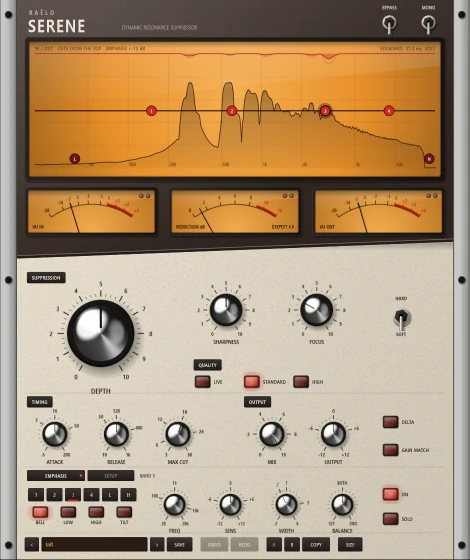
It hears the sound's own shape
Serene listens in three resolutions at once: long windows for the lows, where resonances sit close together, short ones for the highs, where they come and go fast. On a grid of 48 points per octave it draws the sound's natural shape, a smooth line through its tops that knows a voice's harmonics from a problem. Whatever stands out above that line is a resonance, and Serene takes out DEPTH of how far it stands out, for as long as it's there.
Pick a preset
By use: vocals, guitars, drums, keys, mix and master, podcast. Or start from Init.
Turn up DEPTH
Until the harshness is gone, then back off a touch.
Check with DELTA
Hear only what's taken out. You should hear rings and edges, not the music.
Aim it
Drag the EMPHASIS nodes on the screen: work harder on a harsh range, leave the lows or the air alone.
An upright console, cream under espresso
The screen shows the spectrum going in and coming out, with every cut hanging from the top as it happens. Three needle meters read the level in, the reduction, and the level out. Below, polished dome knobs, chrome bat toggles and red-lens buttons. It opens small, at 470 × 560, and scales from 85 to 300 %.
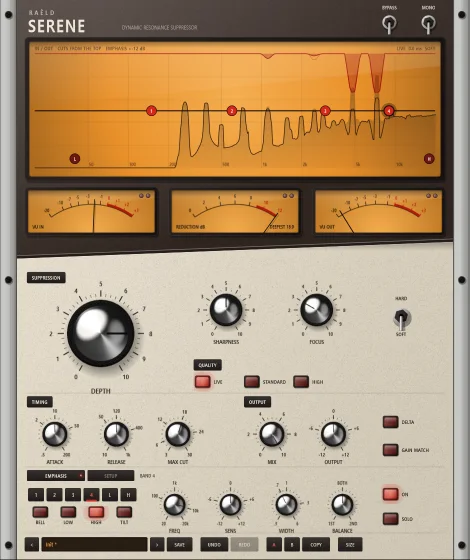
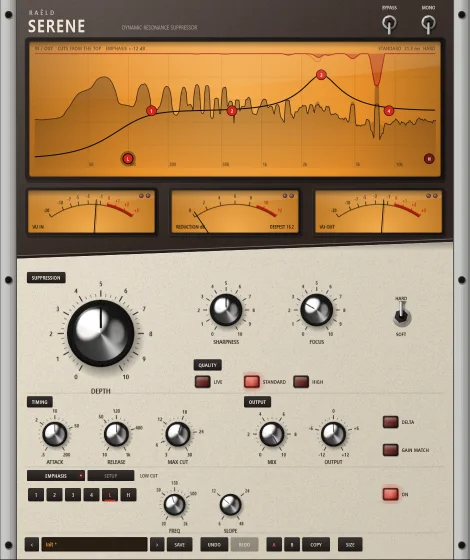
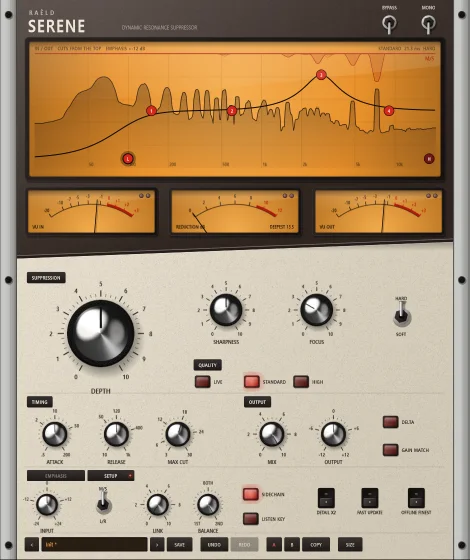
Where, how hard, and how fast
DEPTH, SHARPNESS, FOCUS
DEPTH is the share of each resonance's excess taken out. SHARPNESS shapes the cuts, wide and gentle to narrow and deep. FOCUS decides what counts: broad build-ups at 0, only sharp, standout rings at 10. MAX CUT caps them all.
SOFT or HARD
SOFT is patient: a bump gets its full cut only once it has stayed, so a moving formant, the voice itself, is spared, and it cuts the same at any level. HARD is firmer and immediate, follows the dynamics, and updates twice as often.
EMPHASIS on the screen
A curve of sensitivity, not an EQ: four bands (bell, shelves or tilt) and a LOW and HIGH CUT. Drag a node to work harder on a harsh range, or lower it to leave a region be. SOLO plays what one band's region takes out.
LIVE, STANDARD, HIGH
LIVE has no latency at all, for tracking: up to 12 gliding bells per side. STANDARD (21 ms) and HIGH (43 ms) use a linear-phase filter that adds no phase shift of its own, with bells for narrow rings in the lows.
L/R or M/S, and a sidechain
Left and right, or middle and sides, LINKed or on their own, with BALANCE to work on one side only. SIDECHAIN lets another track drive it: send the lead vocal, and a pad is cut where the voice is resonant, while it sings.
Hear what it does
DELTA plays only what's taken out; with the output it adds up to the input exactly. GAIN MATCH holds the loudness, so you compare tone, not level. When there's nothing to cut, the output is the input, bit for bit.
Tested on planted resonances
The tests use signals with known, planted resonances, so the results can be checked exactly. At 48 kHz. On real recordings, use DELTA and your ears to set how much to take out.
| Test | Result |
|---|---|
| Latency | LIVE 0; STANDARD 21.3 ms; HIGH 42.7 ms, the same at 96 and 192 kHz; reported to your DAW and checked against the actual delay |
| Nothing to cut | the input, bit for bit; on plain pink noise idle 69 % of the time, a cut over 0.5 dB less than 0.3 % of the time |
| A narrow +12 dB ring in pink noise, DEPTH 100 % | 87–95 % of its excess removed from 1 to 12 kHz in every mode; 65 % at 120 Hz; never past flat |
| An octave away from the cut | within 0.015 dB (STANDARD, HIGH), 0.07 dB (LIVE) |
| Voices in four registers, at the default | 200 Hz to 2 kHz within 0.5 dB |
| Pink and white noise, at the default | every octave within 0.04 dB: nothing dulled |
| SOFT from −60 to −20 dBFS | the same cut at every level; nothing cut under −80 dBFS |
| The output plus DELTA | the input, within −136 dB |
| LINK 100 %, a ring on one side | 91 % removed |
| CPU, stereo, one core | LIVE about 2 %, STANDARD and HIGH about 2.5 % |
Where it's weaker: the fastest attack takes 27 ms (HARD) to 42 ms (SOFT) at 2 kHz to reach 90 % of a cut, longer in the lows, because Serene needs to hear a ring for a moment to know it is one.
19 presets, by use
Each one says what it's for. Mostly the EMPHASIS curve says where to listen, FOCUS and SHARPNESS what counts, and SOFT or HARD and the timing how.
| Group | Presets |
|---|---|
| Vocals | Smooth Harshness, Tame Sibilance, Nasal Honk, Air Whistle, Live Tracking |
| Guitars | Boxy Acoustic, Fizzy Distortion, Even Bass Notes |
| Drums | Cymbal Fizz, Overheads, Snare Through, Snare Ring |
| Keys & Synths | Harsh Lead, Piano Evener |
| Mix & Master | Bus Smoother, Harsh Mix, Mastering Polish |
| Podcast & Voice | Clear Voice, De-Ess and Smooth |
| Utility | Make Room (Sidechain) |
Plus Init and your own, with UNDO / REDO and A / B.
2.0 is a free update
Raèld Serene 2.0 replaces 1.0: same plugin, same licence. Your 1.0 sessions open with the nearest 2.0 settings, and your 1.0 user presets are rewritten once for 2.0, with the originals kept. The engine is new, so a 1.0 session sounds close to before, not identical.
| 1.0 | 2.0 |
|---|---|
| SENSITIVITY | FOCUS |
| QUALITY Fast / Standard / Fine | STANDARD / HIGH / HIGH with DETAIL X2 |
| LOW / HIGH range | EMPHASIS's LOW and HIGH CUT |
| TILT | an EMPHASIS band as a tilt |
| STEREO Linked / Stereo / Mid-Side | L/R at LINK 100 % / L/R at LINK 0 % / M/S |
Own it, or get it with everything else
Raèld Serene
One-time payment. No subscription.
- SOFT and HARD, LIVE / STANDARD / HIGH, plugin and standalone
- One license for up to 3 of your computers
- Never expires, works offline 30 days at a time
- Download link and license key by email, instantly
Every Raèld plugin
or $99/year
- Raèld Serene plus every other Raèld plugin
- Every new plugin the day it's released
- One key for all of them, on 3 computers
- Cancel anytime
Secure checkout by Lemon Squeezy. Sales tax and VAT calculated at checkout.
Windows 10/11 (64-bit), VST3 and standalone. Download Raeld-Serene-2.0.0-Windows.zip; DAWs list it as "Raeld Serene", so type "raeld" to find it.
Good to know
How is this different from an EQ?
An EQ cut stays put. Serene's cuts follow the sound: each resonance is turned down only while it's there and only as much as it stands out, so the edge that moves from note to note is taken out without dulling the rest.
SOFT or HARD?
SOFT for vocals, buses and masters: patient, relative, the most transparent. HARD for ringing drums, harsh guitars and piercing notes: firmer, immediate, and it cuts louder resonances more.
Does it add latency?
LIVE has none, for tracking and live use. STANDARD adds 21 ms and HIGH 43 ms (23 and 46 ms at 44.1 kHz), reported to your DAW, which makes up for it automatically.
How low can it work?
Across the whole range. In the lows it hands narrow rings to a set of bells that follow them more closely: a narrow ring at 120 Hz is about two-thirds removed at DEPTH 100 %. DETAIL X2 gives finer detail there.
How do I know it isn't taking out too much?
Press DELTA to hear only what's taken out. You should hear rings and edges, not the music. If you hear the music, lower DEPTH, or raise FOCUS so only sharper peaks count.
I own 1.0. What happens to my sessions?
2.0 is a free update with the same licence. Your sessions open with the nearest 2.0 settings, and your user presets are rewritten once, with the originals kept beside them. The engine is new, so they sound close to before, not identical.
Can I try it first?
Yes. Without a key it runs as a full demo; the only limit is a short dropout every 45 seconds. Enter a Raèld Serene key or your All Access key any time to unlock it.
Does it work on mono tracks?
Yes. It runs on mono, mono-to-stereo and stereo tracks, and your DAW picks automatically. On a mono-to-stereo track the mono source feeds both sides. The MONO toggle folds the output to mono, to check how the mix holds up on a mono speaker; it isn't saved in presets.
Read the Raèld Serene manual · Download · All support questions →
Raèld Serene is an original design and is not affiliated with or endorsed by any other manufacturer.