
Raèld Gain. The right level, on every track.
Put it first on a track, tell it what's there, play the loudest part and press ANALYZE. It proposes the gain that reaches a sensible target, and applies it when you press APPLY. Nothing moves until you say so. Clear meters, pre/post loudness matching, and an optional Gain Rider for vocals.
One-time payment · 3 computers · Instant download
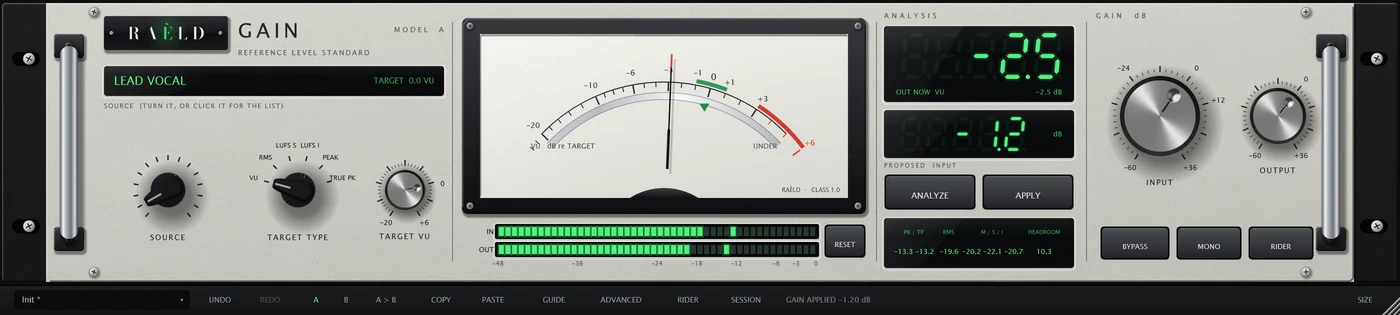
Four steps, and it says which one you're on
A first-use guide in the toolbar walks you through and rings the control it needs. Targets are starting points, not rules: trust your ears.
Put it first
Raèld Gain goes first on the track, before any other plugin.
Choose the SOURCE
Lead vocal, kick, bass, mix bus, master and nine more: each sets a starting target.
Play and ANALYZE
Play the loudest important part. Silence, short clicks and a noise floor are ignored.
APPLY
The proposed gain goes into INPUT, gliding in about 10 ms. UNDO takes it back.
A reference instrument, read at a glance
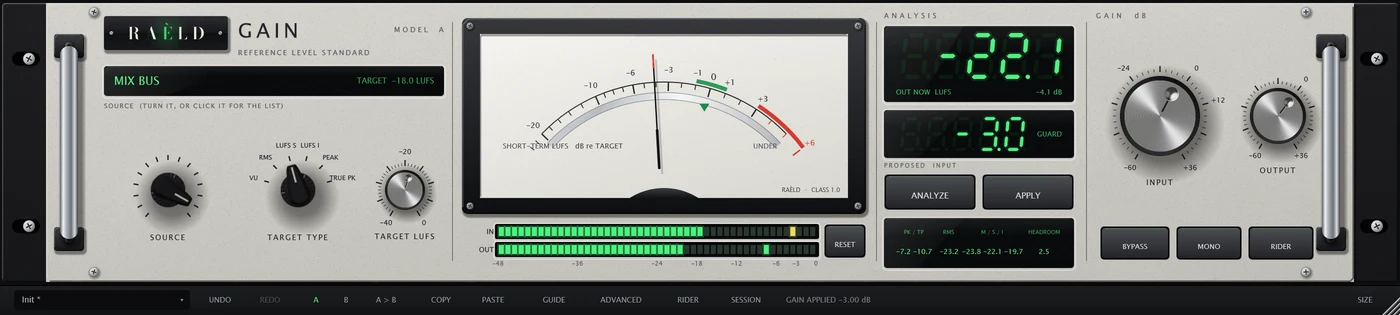
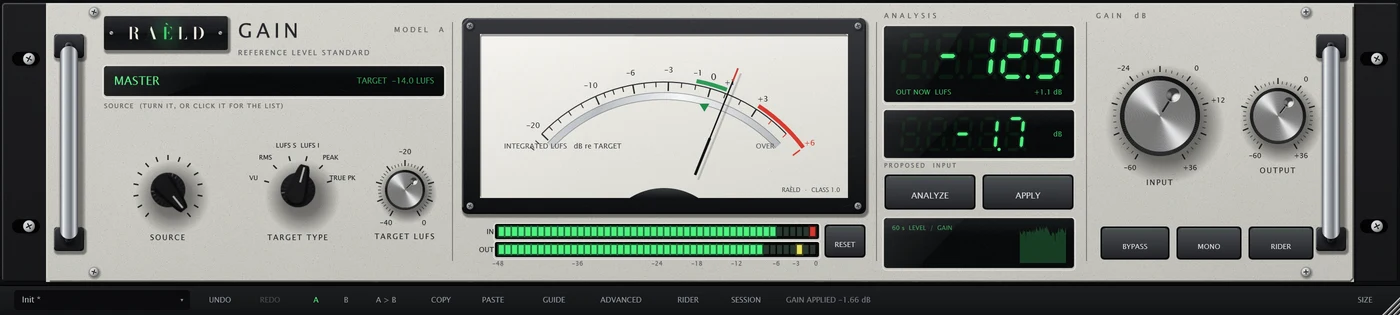
Built as a laboratory level standard: a pale grey powder-coated panel in a rack with polished handles, a large mirror-scale meter that reads the output against your target (0 is on target), green segment digits for the exact numbers, chicken-head selectors that click into place and machined dials for INPUT and OUTPUT. The software keys sit in a quiet rail under the unit. It opens small and scales from 85 to 300 %.
Precise, and easy to trust
ANALYZE, then APPLY
Six kinds of target: VU, RMS, short-term and integrated loudness, peak and true peak. Fourteen source presets set sensible starting targets. PEAK GUARD keeps a proposal from pushing the true peak too high.
Meters you can trust
A standard VU (99 % in 300 ms), sample and true peak, RMS over a window you choose, and loudness momentary, short-term and integrated (ITU-R BS.1770), with headroom, clip warnings and a two-minute history.
Before and after, at the same loudness
One Raèld Gain before a chain of plugins, one after, the same group name: the second matches its loudness to the first, and COMPARE plays the sound without the chain, lined up to the sample and at the same loudness. Works across bridged plugins too.
The whole session in one list
SESSION shows every Raèld Gain you have open: its level, gain applied, target and headroom. Analyse, apply or reset several at once.
An optional Gain Rider
Off unless you turn it on. It rides a vocal toward a target within a range, leaves breaths and noise where they are, follows the song's sections from a sidechain without pumping on the kick, and can write its moves as automation.
Transparent
No latency, and at 0 dB with every option off the output is the input, bit for bit. Gain changes glide, so they never click. 64-bit inside, so nothing clips inside the plugin.
Precise, in numbers
On synthetic test material, through the plugin as a DAW loads it. Nothing from another company has been measured.
| Test | Result |
|---|---|
| At 0 dB, everything off | the input bit for bit, no latency, 44.1 to 192 kHz, any buffer |
| Gain accuracy, -60 to +36 dB | within 0.000001 dB |
| ANALYZE, then APPLY | a fresh analysis reads the target within 0.01, on vocals, drums, bass, a mix and a master |
| Clicks, silence before and after, a noise floor | the proposal moves 0.08 dB at most |
| Loudness meter | EBU test cases within 0.041 LU |
| True peak | within 0.005 dB of the full estimator |
| Gain jumped 12 dB every 100 ms | no click: -90.7 dB of energy away from the tone |
| Pre/post matching | within 0.03 LU, in one program or across two |
| Gain Rider | a vocal's phrases 53 % more even at a 6 dB range; breaths lifted 0.03 dB |
Where it's weaker: with digital silence every couple of seconds in the material, short-term loudness readings move about 0.2 dB, and integrated loudness about 0.5 dB, because the loudness standard counts the edges of each gap.
Own it, or get it with everything else
Raèld Gain
One-time payment. No subscription.
- Analysis, meters, matching, session view and Gain Rider, plugin and standalone
- One license for up to 3 of your computers
- Never expires, works offline 30 days at a time
- Download link and license key by email, instantly
Every Raèld plugin
or $99/year
- Raèld Gain plus every other Raèld plugin
- Every new plugin the day it's released
- One key for all of them, on 3 computers
- Cancel anytime
Secure checkout by Lemon Squeezy. Sales tax and VAT calculated at checkout.
Windows 10/11 (64-bit), VST3 and standalone. Download Raeld-Gain-1.0.0-Windows.zip; DAWs list it as "Raeld Gain", so type "raeld" to find it.
Good to know
Does it change my sound?
Only its level. At 0 dB with every option off the output is the input, bit for bit. It adds no latency (unless you turn on the Gain Rider's look-ahead, which your DAW makes up for automatically).
Will the gain move by itself?
No. ANALYZE only proposes; nothing changes until you press APPLY (or turn on AUTO APPLY). The only things that move the gain on their own are the ones you turn on: the Gain Rider, and a POST set to follow its PRE continuously.
Which target should I use?
Start with the SOURCE: it picks a common target for that kind of track (0 VU for a vocal, -10 dBFS peak for a kick, -14 LUFS integrated for a master). They're starting points; change the target if your chain likes a different level.
Does pre/post matching work with bridged plugins in FL Studio?
It's built for it: the two instances find each other across processes, and COMPARE lines up to the sample. Tested between separate programs on Windows; check it in your own setup with the steps in the manual.
Can I try it first?
Yes. Without a key it runs as a full demo; the only limit is a short dropout every 45 seconds. Enter a Raèld Gain key or your All Access key any time to unlock it.
Does it work on mono tracks?
Yes. It runs on mono, mono-to-stereo and stereo tracks, and your DAW picks automatically. MONO folds the output to mono, to check a mix; it isn't saved in presets.
Read the Raèld Gain manual · Download · All support questions →
Raèld Gain is an original design and is not affiliated with or endorsed by any other manufacturer.