
Raèld Clip 2.0. Louder, and still punching.
Shave the peaks off a master, a bus or a single track, and choose how it sounds: an exact hard clip, a soft knee, the overload of a modern or a classic converter, tape, tube or transistor. Everything below the clip point passes untouched, and TP SAFE keeps the true peak where you set it. All in a slab of black volcanic stone cracked with lava, whose huge INPUT runs white-hot as you drive it.
One-time payment · 3 computers · Free update for 1.0 owners
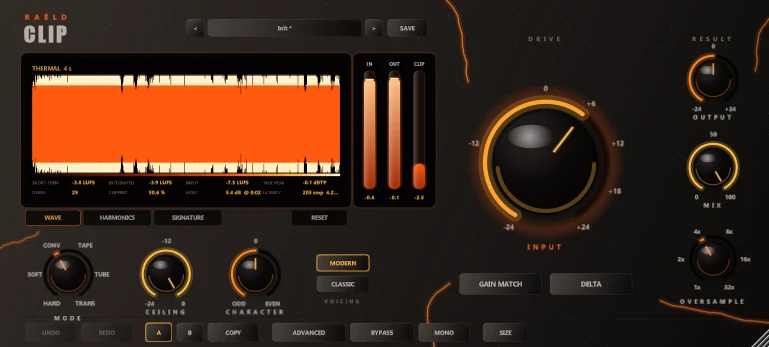
Drive, choose, compare
1. Drive INPUT
Turn the big knob until the CLIP meter shows a few dB. The ring of lava around it grows with the value and runs white-hot as it clips harder.
2. Choose the MODE
The modes are matched in loudness, so switching changes the character, not the level. The display shows each one's harmonic fingerprint.
3. Compare honestly
GAIN MATCH plays the clipped sound at the input's loudness, so bypass tells you the truth. DELTA plays only what's taken off.
Every mode has its own fingerprint
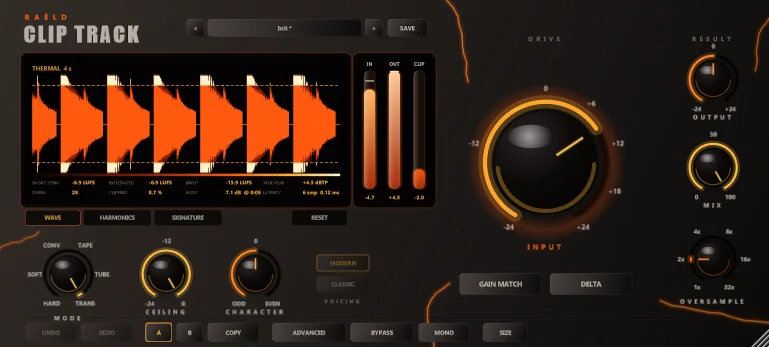
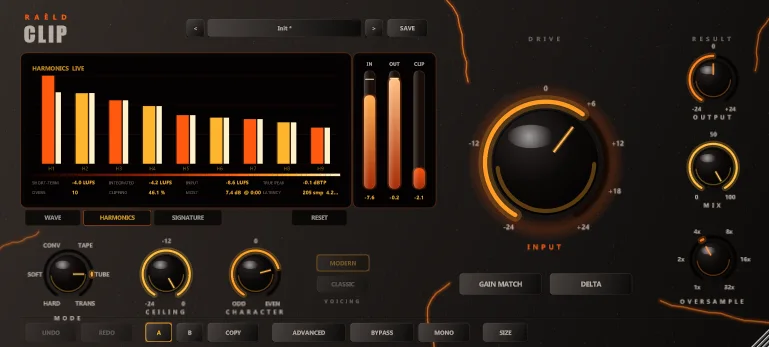
Each picture is Raèld Clip's SIGNATURE view: the harmonics that mode makes on a full-scale tone, shown live as you change any setting. Orange bars are odd harmonics, yellow ones even. Pick a mode to see it.
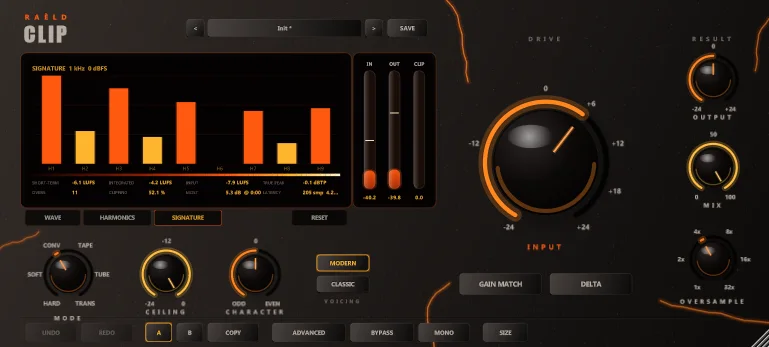
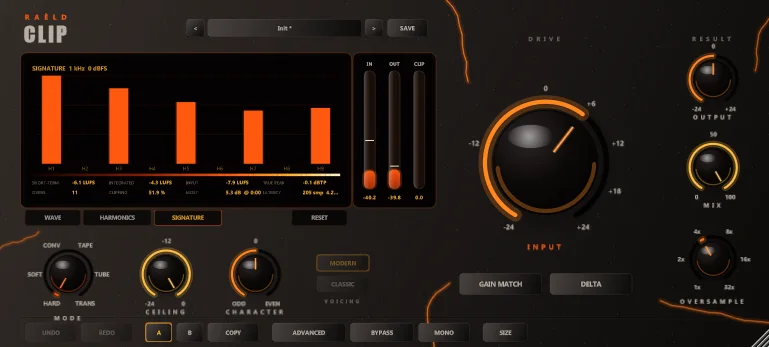
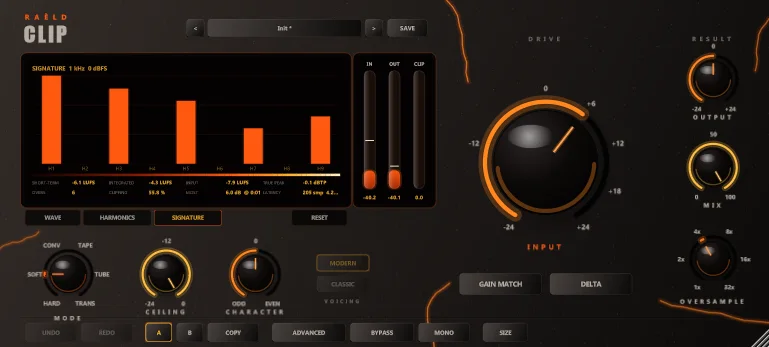
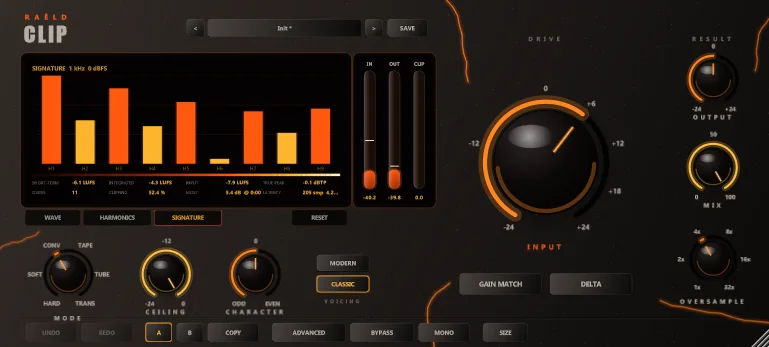
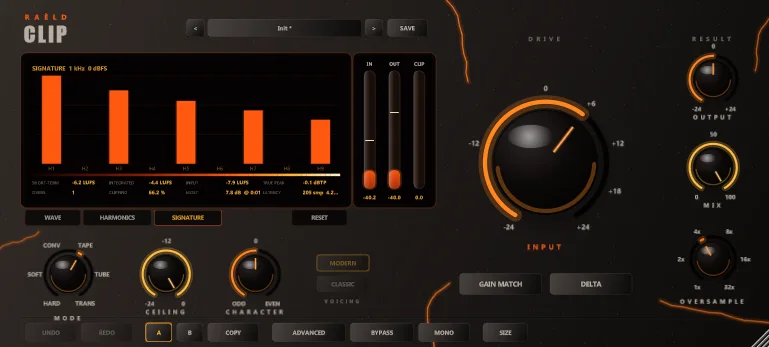
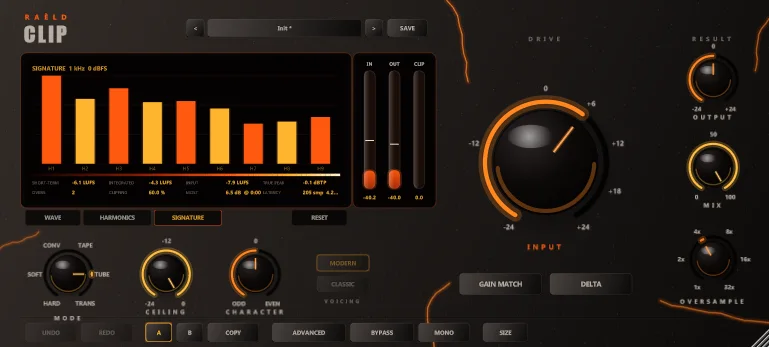
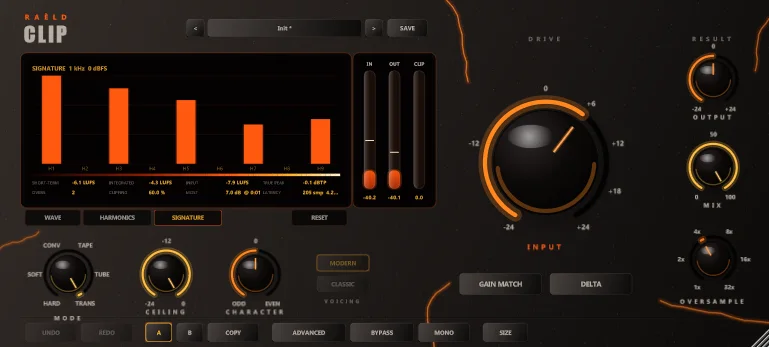
CONVERTER MODERN · a modern converter's overload: tight knee, hard rail
The analog modes are modelled on the behaviour of tape, tube and transistor stages. CHARACTER, BIAS, KNEE and RESPONSE shape any mode further.
Two plugins, one engine
The same modes, controls and sound. One licence unlocks both.
Set up for mastering: 4x linear-phase oversampling (exact below the clip point) and TP SAFE on, holding the true peak at your limit.
- About 4.3 ms of latency at the 4x default, with TP SAFE
- OFFLINE oversampling: up to 32x when you bounce
- Master presets held at −0.3 to −1 dBTP
Set up for mixing: 2x minimum-phase oversampling for a fraction of a millisecond of latency, TP SAFE off, light on CPU.
- About 0.13 ms of latency at its defaults
- Track presets for drums, kick, snare, 808, bass and vocals
- Parallel MIX that never comb-filters
Simple on top, everything underneath
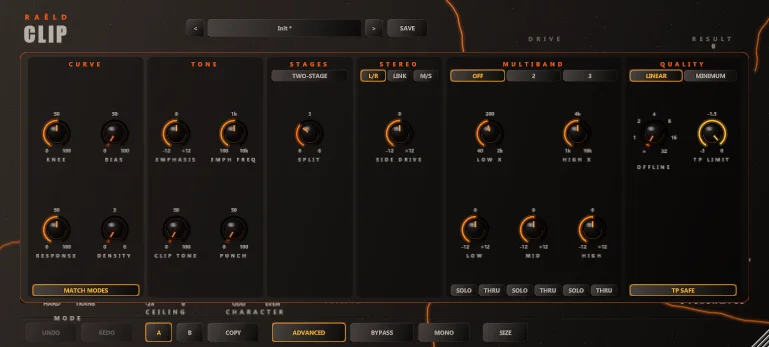
The main view has what most material needs: INPUT, CEILING, MODE, CHARACTER, OUTPUT, MIX, GAIN MATCH, DELTA and OVERSAMPLE. ADVANCED opens the rest.
TP SAFE
Removing a clip's harmonics on the way down lets peaks rise again between the samples. TP SAFE holds the output's true peak at your limit, ready for streaming.
Multiband
Two or three bands that add back up to the input exactly. Drive the low end less to keep a kick and 808 round while the top is pushed; solo any band, or what was taken from it.
Stereo and mid/side
Each side on its own, linked so the image holds on hits, or the middle and the sides apart, with the sides driven harder or softer.
PUNCH and TWO-STAGE
PUNCH lets the front of each hit through clean, so drums keep their attack. TWO-STAGE splits the clipping between the mode and a clean final stage: louder, still round.
Tone
EMPHASIS clips the lows or the highs harder and puts the tone back after. CLIP TONE softens the fizz the clip adds above 8 kHz. DENSITY lifts the level below the ceiling.
Meters that tell you
The waveform with the clipped peaks, IN / OUT peak and true peak, the clip meter, LUFS, overs, the share of time clipping and the moment of the most clipping, and the harmonics, live.
What we measured
On test tones and synthetic drums, bass, mixes and masters, at 48 kHz.
| What | Result |
|---|---|
| Below the clip point | HARD passes the audio bit for bit at every oversampling setting (linear phase) |
| Aliasing, a sine 6 dB into the clip | 81 dB or more under the tone at 8x in every mode; 105 dB or more at 16x |
| The modes' loudness | matched within 0.01 LU on average over drums, 808, mix and master |
| GAIN MATCH | within 0.02 LU of the input |
| TP SAFE | holds the true peak at TP LIMIT: in 168 runs (every mode, six settings, both filters, a master and a drum bus 6 dB into the clip) the highest was 0.03 dB over it |
| Latency | exactly what your DAW is told, at every sample rate, buffer size and setting |
| CPU, stereo 48 kHz, 4x | about 2.1 % of one core in HARD, 2.5 to 3.6 % in the analog modes |
Eleven presets for real jobs
Made for material peaking near 0 dBFS. Pick one, then move INPUT until the CLIP meter shows the amount you want.
| For | Presets |
|---|---|
| Masters | Master Loud Clean, Master Warm Glue, Trap Master, Rock Master, Gentle Peak Control |
| Drums | Drum Bus Smash, Kick Punch, Snare Crack |
| Bass | 808 Grit, Bass Weight |
| Vocals | Vocal Edge |
Plus Init and your own, with A / B compare, undo and redo.
Before and after
Press play, then flip between Before and After. Both play in sync, so you hear the same moment either way. Headphones or monitors recommended.
2.0 is a free update
Raèld Clip 2.0 replaces 1.0: same plugins, same licence. Your 1.0 sessions open with their settings translated (Gold becomes CONVERTER, Silk becomes SOFT with a small knee, Warm becomes TUBE, THRESHOLD becomes CEILING, the safety ceiling becomes TP SAFE), and your 1.0 user presets are rewritten once for 2.0, with the originals kept. The engine is new, so a 1.0 session sounds close to before, not identical.
Own it, or get it with everything else
Raèld Clip
One-time payment. No subscription.
- Raèld Clip and Raèld Clip Track
- One license for up to 3 of your computers
- Never expires, works offline 30 days at a time
- Download link and license key by email, instantly
Every Raèld plugin
or $99/year
- Raèld Clip plus every other Raèld plugin
- Every new plugin the day it's released
- One key for all of them, on 3 computers
- Cancel anytime
Secure checkout by Lemon Squeezy. Sales tax and VAT calculated at checkout.
Windows 10/11 (64-bit), VST3 and standalone. Works in Ableton Live, FL Studio, Cubase, Studio One, Reaper, Bitwig and other VST3 hosts.
Good to know
Where does a clipper go in my chain?
On the master, put Raèld Clip just before your final limiter (or instead of it, with TP SAFE on): the clipper takes the sharpest peaks, so the limiter has less to do and pumps less. On tracks and buses, use Raèld Clip Track wherever you'd reach for a transient tamer or some grit. The manual.
Which mode should I use?
Start with CONVERTER MODERN on masters and drum buses, HARD where you want the most transparent loudness, TUBE on 808s and bass, TAPE for glue, TRANSISTOR for bite, SOFT for vocals. Switch GAIN MATCH on and flip through them: they are matched in loudness, so you hear only the character.
Will my master pass the −1 dBTP streaming limit?
Yes: with TP SAFE on (it is in Raèld Clip) and TP LIMIT at −1.0, the output's true (inter-sample) peak stays at −1 dBTP, the level Spotify, Apple Music and YouTube ask for. The Gentle Peak Control preset is set up for it.
Which oversampling should I use?
4x is clean for most material; 8x for bright masters pushed hard. Set OFFLINE to 16x or 32x and the bounce uses it, while you play at 4x. The latency your DAW is told stays the same either way, so the bounce lines up.
Should I buy it or subscribe?
If Raèld Clip is the only Raèld plugin you want, buying it is cheapest over time. If you want the other Raèld plugins too, or every new one as it comes out, All Access costs less up front. Compare both.
Can I try it first?
Yes. Without a key the plugin runs as a full demo; the only limit is a short dropout every 45 seconds. Enter a key any time to unlock it, with no reinstall.
Does it work on Mac, and on mono tracks?
Not on Mac yet: Raèld Clip is VST3 and standalone for 64-bit Windows 10 and 11. It runs on mono, mono-to-stereo and stereo tracks, and the MONO switch folds the output to mono to check a mix.